
Navigation Bar (top of the screen)

- Home menu
- Shortcut to your Fixed Retainers to bend list
- Clock (if enabled in Settings)
- Wi‑Fi/Ethernet connection status
- Access to Help & Contact Support
- Access to My Account
Home Menu
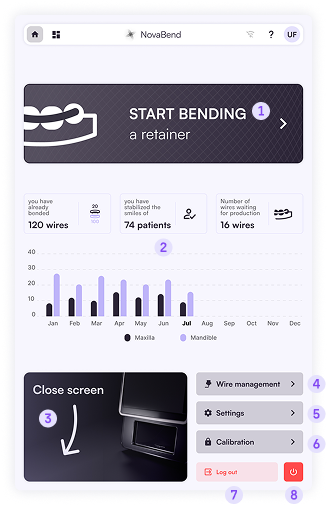
- Start bending a fixed retainer – opens the page with your retainers projects to build
- Overview of your statistics – total and monthly figures
- Open/Close screen – tap to deploy or retract the touch screen
- Wire management – insert or remove the wire
- Settings – display and Wi‑Fi options
- Calibration – reserved for authorized technicians to adjust sensors
- Log out – ends the current account session
- Turn off – starts the full shutdown process for NovaBend™