
After ordering the retainers, you can send a detailed message to the production team. At any time, you can also contact the team via this project-dedicated space (= upper maxillary retainer and lower mandibular retainer). A technician will get back to you as soon as possible.
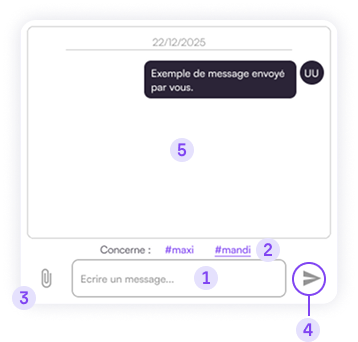
1. Type your message in the text field (press Enter to create a new line).
2. Type or use the shortcuts #maxi and #mandi to indicate the relevant arch.
3. The icon  allows you to add an attachment from your device (image or PDF) to your message.
4. Click the Send icon pour envoyer votre message.
(or use keyboard shortcut:
Shift + Enter )
3. Conversation area.
The chat also notifies you if production encounters a problem during design (e.g., a deadlock or a validation request).
At the beginning of each project row, a dot indicates whether there are messages:
- No dot: no discussion or request in progress
- Gray dot: all messages have been read
- Red dot: you have an unread message or request