
To connect to a secure Wi‑Fi network:
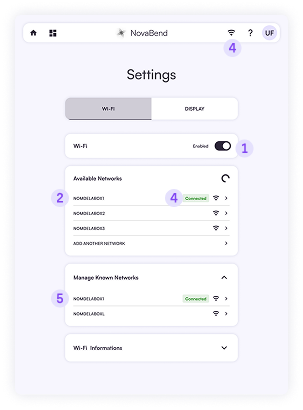
- Open quick settings by tapping the Wi‑Fi icon in the navigation bar, or go to
 Settings → Wi‑Fi and switch it On.
 - From the list of Available Networks, select your router’s SSID.
- If the network isn’t shown:
- Tap Add another network.
- Enter the exact SSID.
- Type the associated password.
- If the network isn’t shown:
- Carefully enter the password (respect letters) and tap Connect.
- The status changes to Connected and the Wi‑Fi icon updates.
- Manage saved networks:
- Go to
 Settings → Wi‑Fi → Manage known networks.
 - You can Disconnect a network temporarily or Delete a network you no longer need.
- Go to
 Settings → Wi‑Fi and switch it On.
 Settings → Wi‑Fi → Manage known networks.
Resetting: If connection repeatedly fails, toggle Wi‑Fi off/on or restart the device.